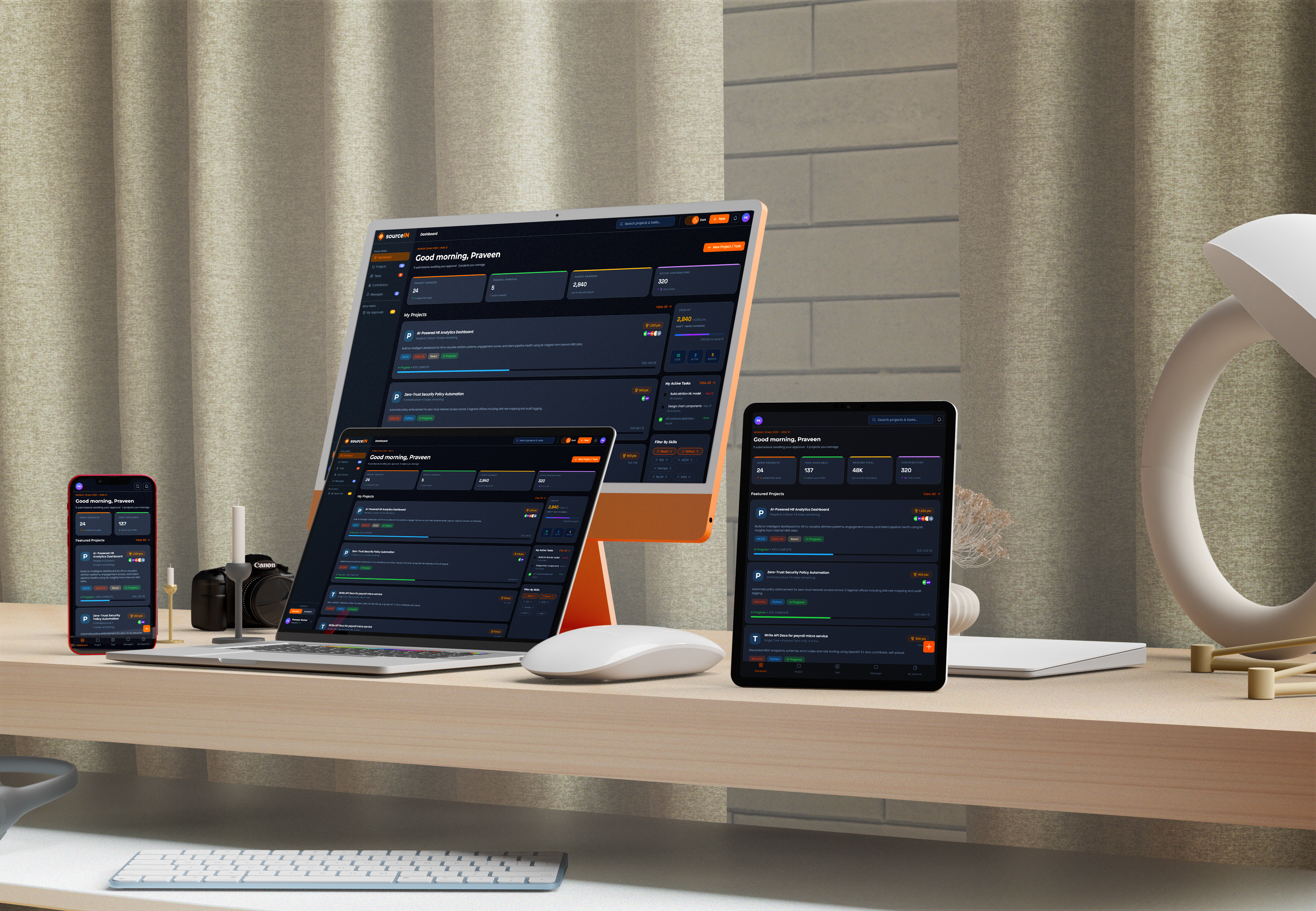
SourceIN dashboard shown across desktop, tablet and phone
01 - Intro

“An internal crowdsourcing platform concept designed from scratch as a UI/UX exploration. My scope covered the full design layer: problem framing, information architecture, interaction design, high-fidelity UI, and a fully interactive Figma prototype handed off to the development team for engineering.

02 - Problem

In most organisations, skilled employees sit underutilised while other teams scramble to meet deadlines with insufficient capacity. The problem isn't headcount it's invisible availability and siloed work distribution.

Requestors resort to informal Slack asks, lengthy hiring cycles, or costly contractors for work that qualified colleagues could complete in hours. Contributors, meanwhile, have no structured channel to raise their hand leading to disengagement and stagnant skill growth.

68%

of employees feel their skills are underused in their current role leading to disengagement within 18 months.

3.4x

more expensive to hire a contractor for a task versus having an internal employee with equivalent skills complete it.

74%

of cross-team project work is still assigned via informal channels Slack, email, hallway asks with no tracking or accountability.

The Design Question

How do we make internal talent visible and work discoverable - while giving employees a real reason to participate?

No visibility into internal capacity

Teams don't know who's available, what they're skilled at, or how much bandwidth they have even in the same department.

Informal and unfair task distribution

Work gets routed to the usual suspects the same few visible people while skilled but less networked employees are overlooked.

Contractors for work employees could do

Short-term tasks get outsourced at high cost when the skill already exists internally a direct efficiency drain.

No mechanism for skill development

Employees lack structured ways to work on cross-functional projects, limiting growth and engagement between performance cycles.

03 - Solution

sourceIN is a dual-role internal crowdsourcing platform. Requestors post structured projects and tasks with defined rewards. Contributors discover, claim, and submit work earning points, XP, and recognition. A built-in approval loop keeps quality accountable.

Structured, not informal

Every task has a title, brief, reward, deadline, and skill tag. No more vague Slack asks with no accountability or output tracking.

Skill-matched discovery

Contributors see projects that match their declared skills first. Requestors get a ready pool of relevant people not the same handful of loud voices.

Incentives that don't cost payroll

Points, XP levels, leaderboard ranking, and achievement badges drive participation. Meaningful recognition without touching compensation structures.

Approval loop for quality

Contributors submit work with notes and files. Requestors review, approve or reject with feedback. Points only credit after approval quality is enforced.

One platform, two roles

Any employee can be a Requestor or Contributor or both. A single toggle switches context. No separate accounts, no friction.

Communication built in

LinkedIn style project channels and DMs keep conversations attached to the work not scattered across Slack, email, and Teams.

How the platform is structured

SourceIN platform
Dashboard
Projects
Tasks
Role Page
Messages
XP & Level
Browse & Search
Kanban Board
My Approvals
Project Channels
Active Tasks
Project Details
List View
My Requests
Direct Messages
Featured Projects
Task Board
Task Drawer
Submit Work
File Sharing
Skill Filters
Join / Watch
Claim & Submit
Review Queue
Member List
Request only Contributor only Shared
Features-01

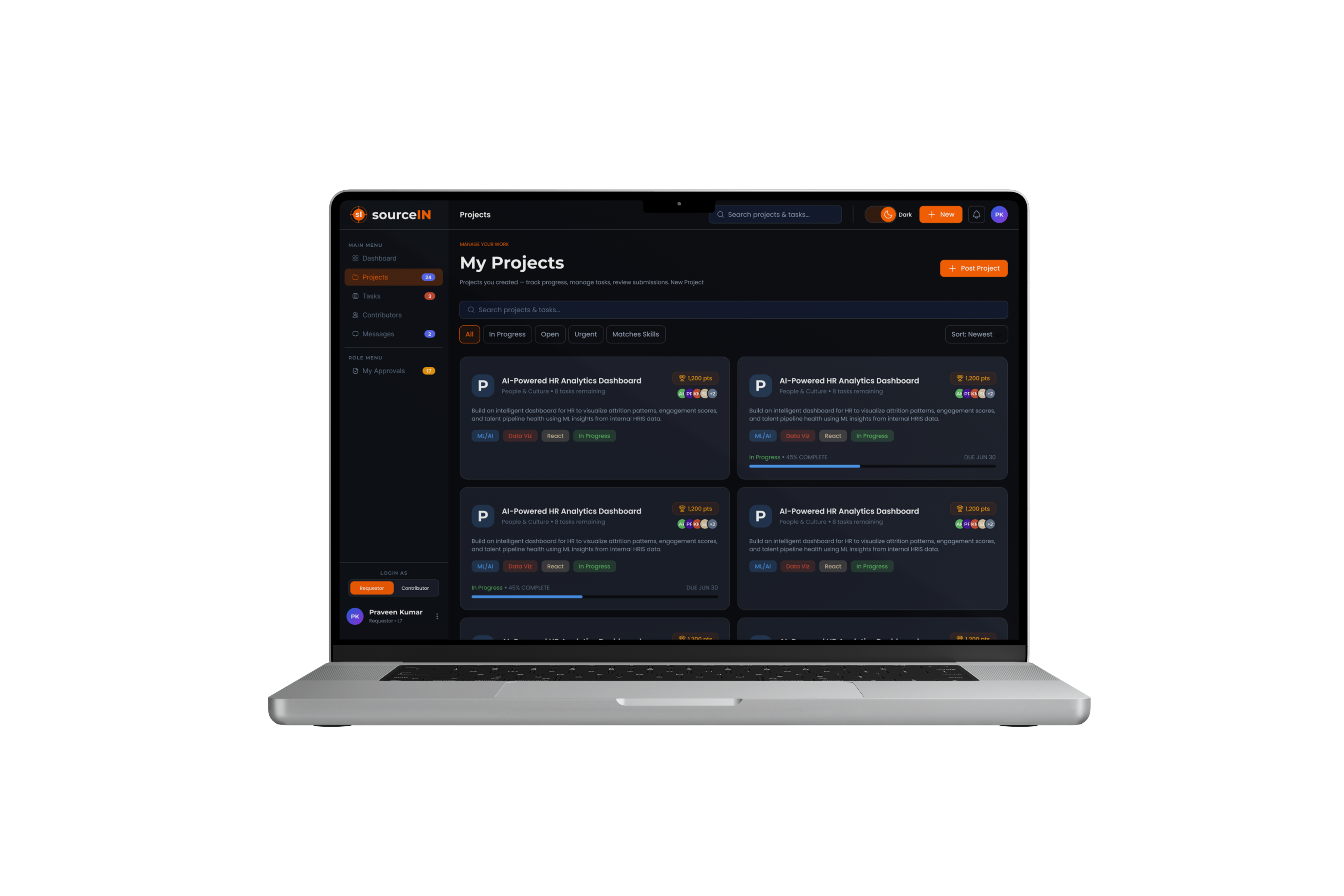
Project & Task Marketplace

Requestors post structured projects with a full brief, skill requirements, reward pool, and deadline. Work is broken into discrete tasks each claimable by a single contributor. Quick solo tasks surface alongside full projects so contributors can match their available time.

  • 3-step project creation: Info → Add Tasks → Review & Publish
  • Tasks pre-linked to their project on creation no orphaned work
  • Quick Task flag for solo, time boxed deliverables (3–8 hrs)
  • Skill tag filtering, global search across all projects and tasks
SourceIN project marketplace
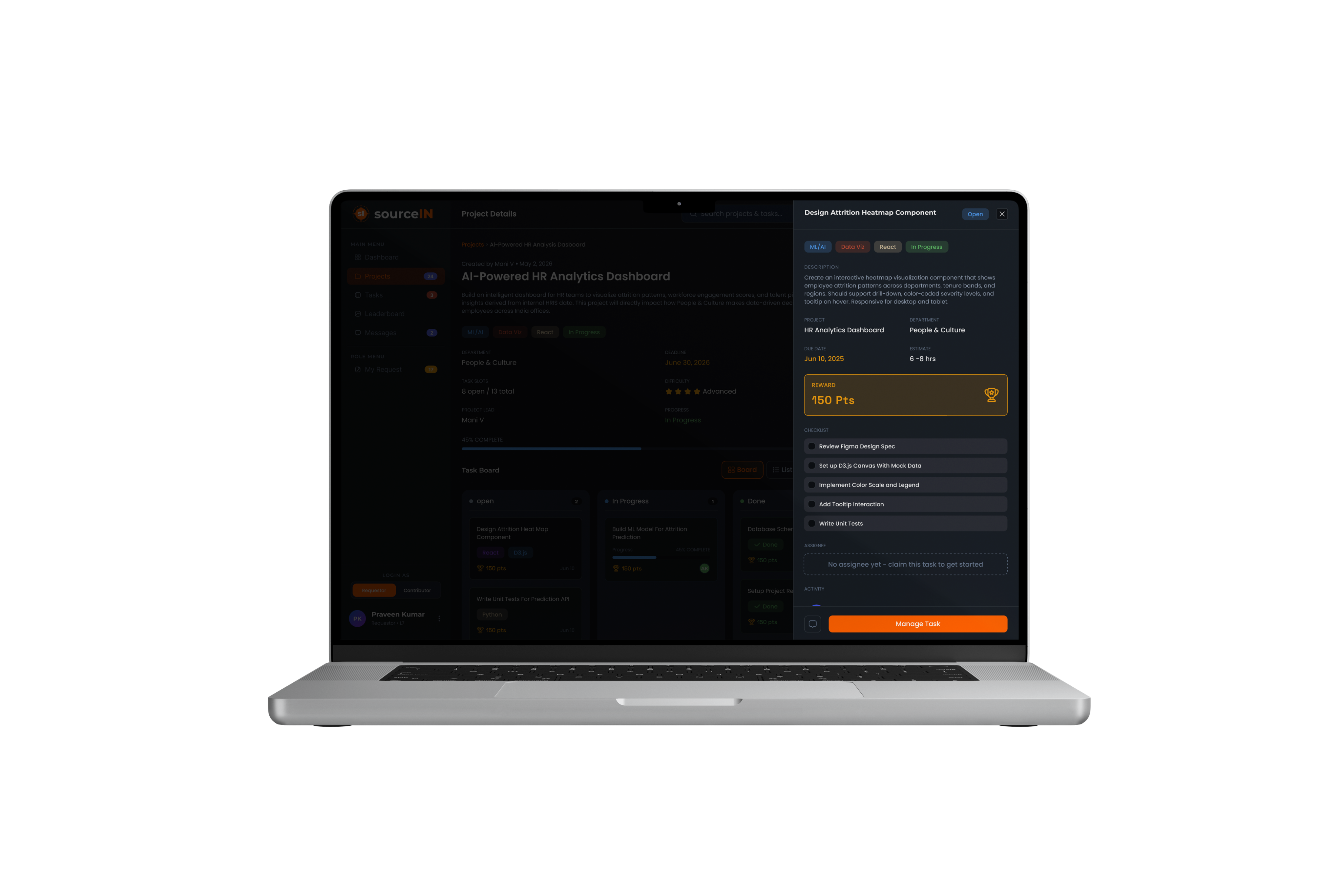
SourceIN task drawer
Features-02

Task Drawer & Claim Flow

Clicking any task card opens a detailed side drawer without leaving the page. Contributors see the full brief, interactive checklist, reward, due date, assignee, and a live activity/comment feed. Claiming is a single tap the task moves to In Progress immediately.

  • Contextual CTA Claim / Submit / View adapts to task state
  • Interactive checklist updates completion progress in real time
  • Comment box with @mention support and file attachments
  • One-tap jump to project channel from the drawer footer
Features-03

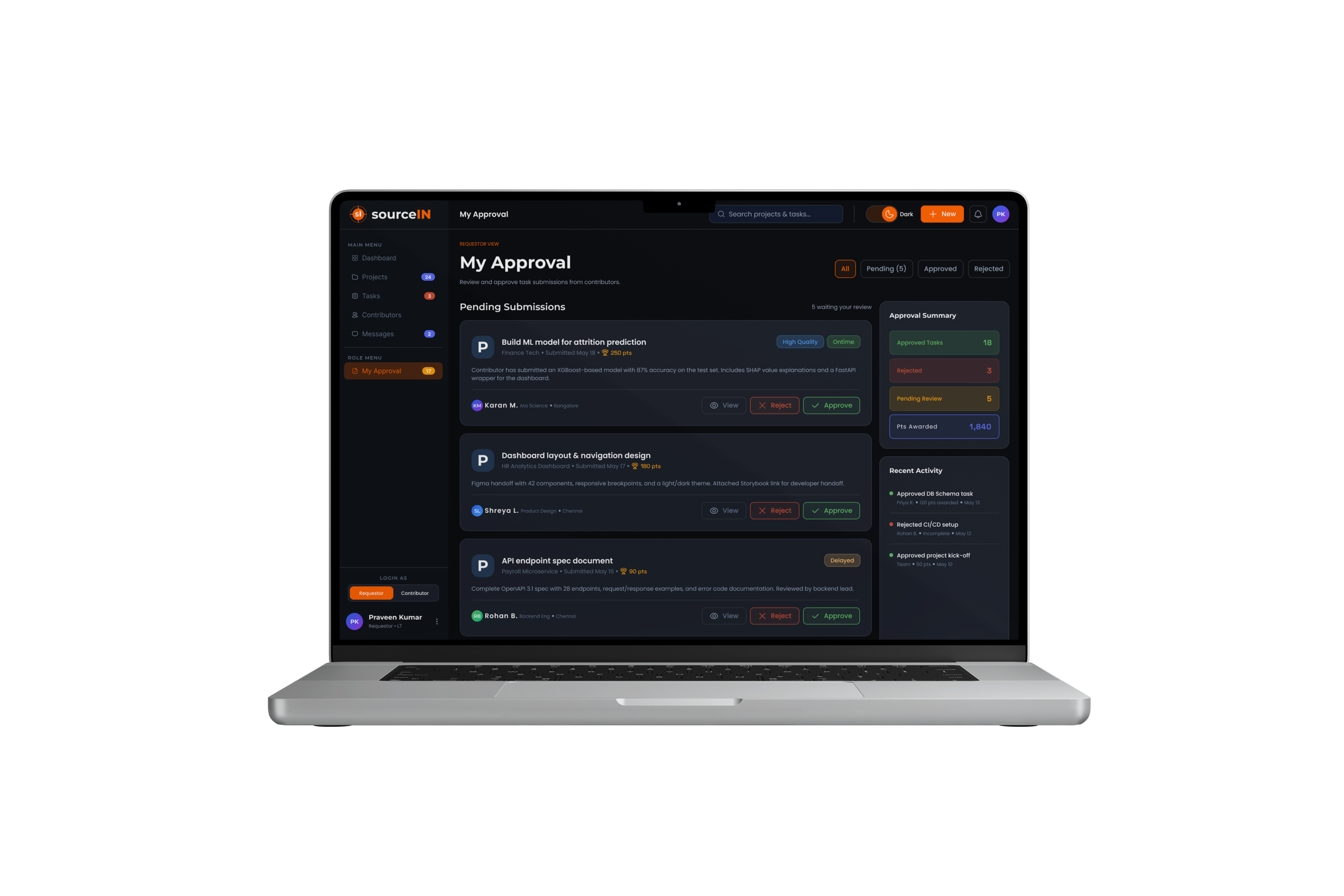
Submit → Review → Approve

When work is done, contributors open a Submit Work modal write a note, attach files, add a link and send it to the requestor's review queue. Requestors review the full submission in a dedicated side panel, write optional feedback, then approve or reject. Approval triggers instant points credit.

  • Submission drawer shows note, attached files with download, and feedback field
  • Rejection requires a reason category + written feedback no silent blocks
  • Rejected submissions unlock a Resubmit button on the contributor side
  • Approval badge counter decrements live; activity feed logs every decision
SourceIN review and approval
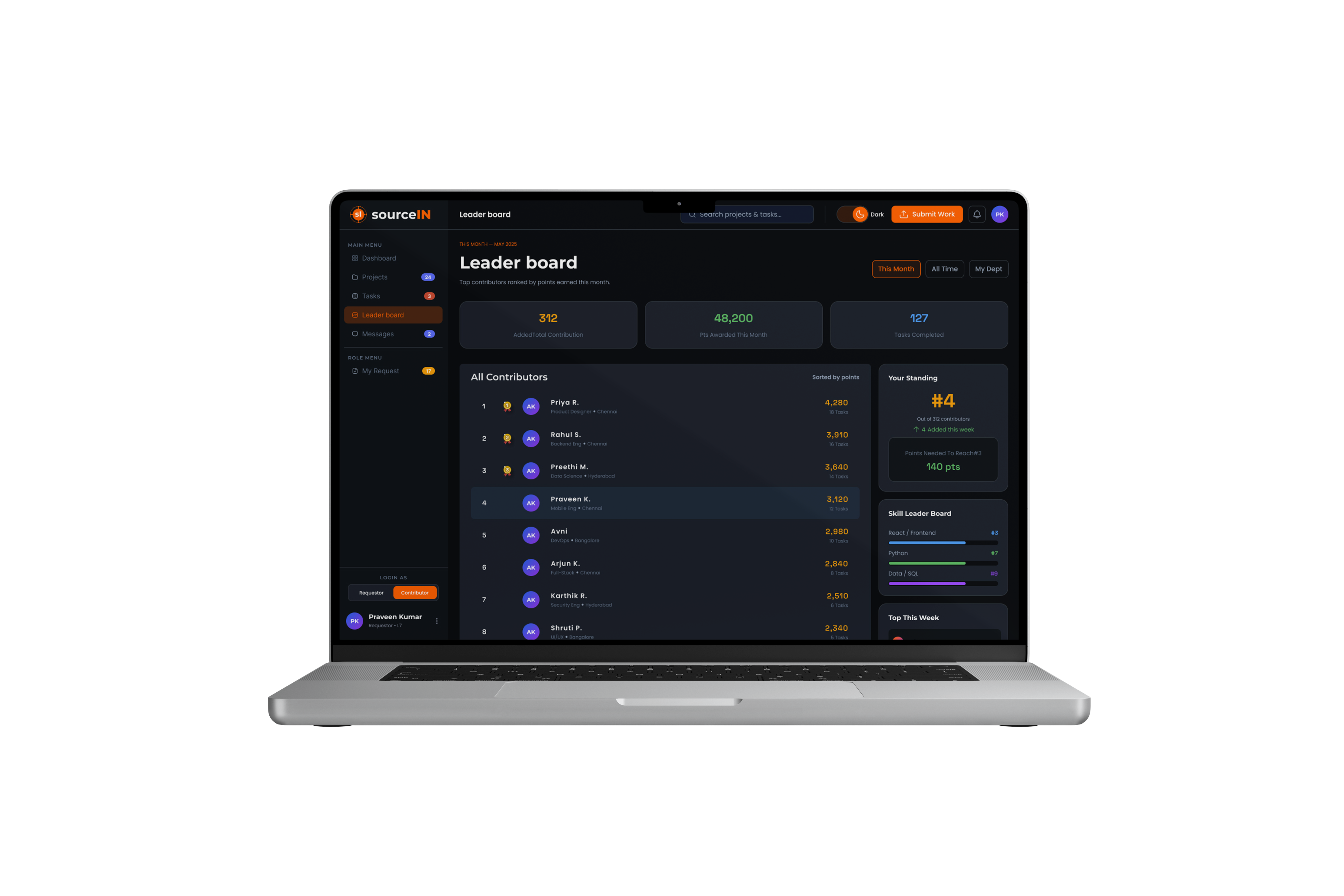
SourceIN leaderboard and badges
Features-04

XP, Leaderboard & Badges

Every approved submission credits points and XP. Employees level up through 8 tiers from First Contributor to Platform Legend. A company-wide leaderboard shows weekly and all-time rankings. Badges unlock on milestone contributions, creating visible markers of cross-functional impact.

  • 8 XP levels visible on profile, leaderboard, and task assignments
  • Leaderboard filterable by this week, this month, all-time, or department
  • Badges for: First Blood, Speed Runner, Team Player, ML Pioneer, Top 3
  • “Points to next rank” shown live maintains competitive motivation
Features-05

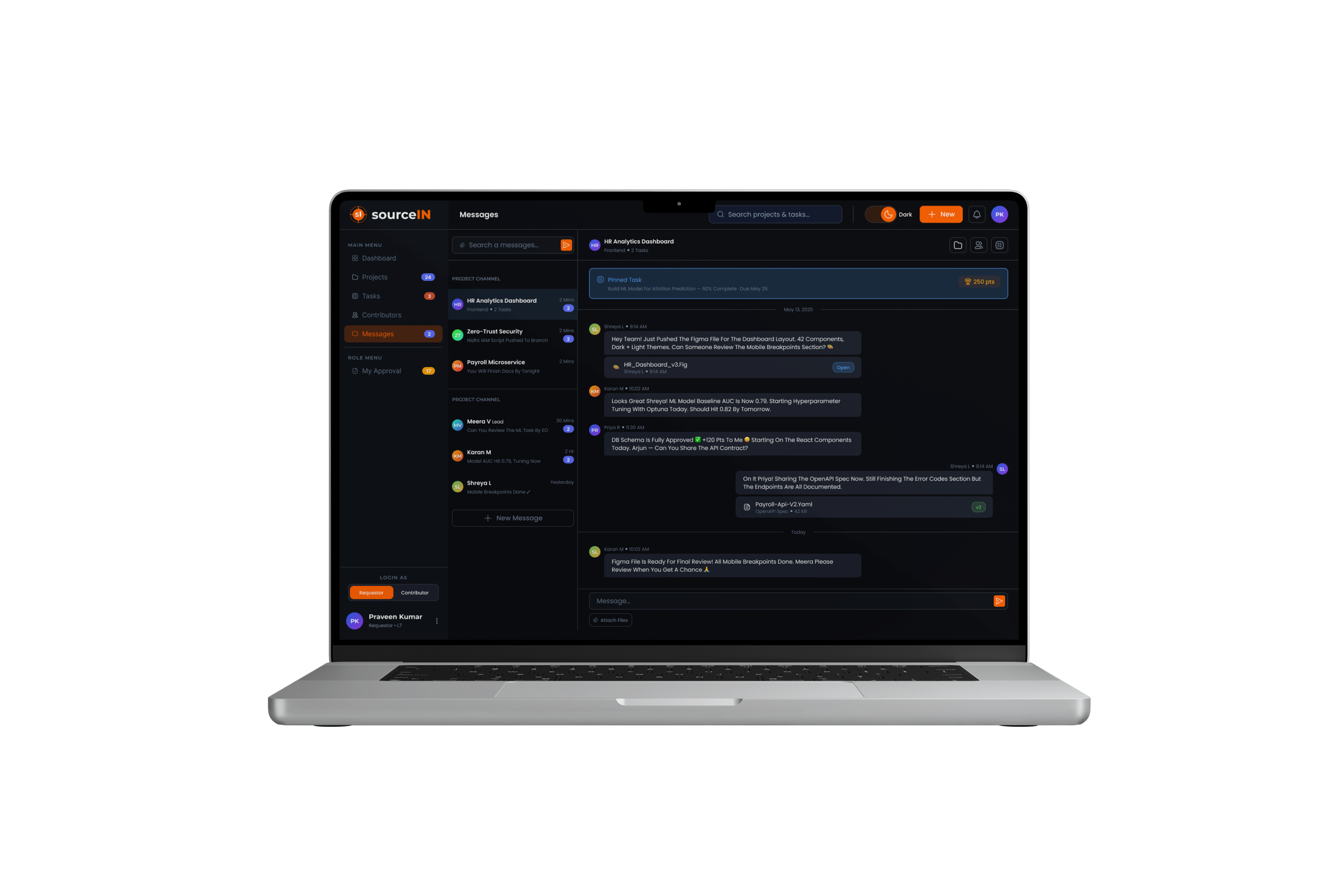
Project Channels & Direct Messages

Each project gets a dedicated channel with its full team. Contributors and requestors communicate in context no more scattered threads across external tools. DMs handle one-to-one conversations. Both support file sharing, task pinning, and a “Submit Work” shortcut right from the input bar.

  • LinkedIn-style sidebar: project channels grouped separately from DMs
  • Pinned task banner in every channel always visible above messages
  • Members panel with live presence, roles, and task count per contributor
  • Create new channel with privacy toggle (Public / Private) and member invites
SourceIN project channels and messages
04 - Comparative Analysis

External tools weren’t built for this.

The team evaluated six tools currently used across the organisation from project management to freelance platforms to understand why none solved the internal talent discovery and task distribution problem on its own.

The Gap

Every existing tool either lacks the internal context (who's available, what their role is) or the incentive mechanics (points, XP, recognition) that make participation self-sustaining. sourceIN combines both built from the inside out.

Tool / platform Primary use Task posting Internal talent pool Skill matching Incentive system Approval workflow Fit for internal
Jira / Linear Engineering PM Partial Engineering only
upwork / fiverr External Freelance (pay) No internal access
Slack / Teams Communication Informal only
Notion / Confluence Knowledge Base Manual Documentation only
Microsoft Via / Workday HR / People ops Limited No task layer
Toptal / Andela Vetted Talent (pay) External + Costly
SourceIN Internal Crowdsource (points + XP) Purpose - built

sourceIN's unique position

No existing tool combines internal employee identity, structured task discovery, skill-based matching, gamified incentives, and a formal submission approval workflow in a single surface. That's the gap sourceIN fills entirely inside the organisation's trust boundary.

Internal Trust Boundary

Works within org identity, SSO, and HR data contributors are verified employees, not strangers from the internet.

Non-monetary Incentives

Points, XP, leader boards, and achievements drive participation without payroll complexity or equity concerns.

Structured Accountability

Submit → review → approve workflow ensures quality control, unlike informal channels where output is invisible and unverifiable.

05 - Process

sourceIN is a Proof of Concept built without formal stakeholder interviews or user research. The hypothesis was formed from observable organisational pain, and the design was used as the research instrument itself.

01

Define

Framing the problem from observable signals no interviews, but real organisational data.

  • Observed informal talent requests in Slack & email
  • Identified contractor spend on internally-doable work
  • Mapped roles: who has work vs who has capacity
  • Defined Requestor and Contributor archetypes
  • Set product hypothesis and success metrics
Assumption-led

02

Design/Ideate

From zero to high-fidelity UI in Figma treating the prototype as a conversation starter.

  • Information architecture and navigation model
  • Dual-role system: Requestor and Contributor views
  • Core flows: post → discover → claim → submit → approve
  • Gamification: XP, leaderboard, badges
  • Dark + light mode, mobile-first responsive layout
  • LinkedIn-style messaging layer
Figma Interactive Prototype

03

Develop

The Figma prototype is the deliverable fully interactive with real flows, component states, and handoff-ready specs.

  • Functional task drawer with checklist, activity, comments
  • Submit work modal with file attachments
  • Requestor approval / rejection workflow
  • Role-aware views Requestor ↔ Contributor toggle
  • Working search, notifications, chat, project watch
Interactive PoC Live

04

Deliver

Next validate assumptions with real users before committing to engineering build.

  • Stakeholder walkthroughs with the PoC
  • Usability testing: 5–8 employees per role
  • Assumption validation: participation rate, task completion
  • Refine flows based on findings
  • Engineering handoff if hypothesis holds
Done

Why a PoC-first approach?

In enterprise environments, stakeholder buy-in often requires something tangible to react to not a research report. A working, high-fidelity prototype is more persuasive than a slide deck, and faster to produce than a formal research sprint. sourceIN uses design itself as the validation instrument.

06 - Personas

These personas are composite archetypes built from observable organisational behaviour not from interviews. They represent the two primary roles the platform is designed around.

Meera V

Product ManagerPeople & Culture6 yrs exp.
Requestor Mid - Senior
Meera V

"I have real deliverables dashboards, tools, automations but my team doesn't have bandwidth. I know the skill exists in this company. I just can't find it."

Goals

  • Get skilled colleagues to contribute to project tasks without long hiring cycles.
  • Track submission quality before rewarding contributors.
  • Build a reputation as a fair, engaged project requestor.

Frustrations

  • Slack asks get ignored or produce poor-quality output with no accountability.
  • No way to know who's available or skilled enough without asking around.
  • Approval process for contractor spend is slow and bureaucratic.
Posts Projects Reviews Submissions Approve/rejects Work Awards Points

Karan M

Karan M

Data ScientistAnalytics Tribe2 yrs exp.
Contributor Growth Stage

"I have skills that go way beyond my current sprint. I'd love to work on something meaningful across teams and get recognised for it beyond my annual review."

Goals

  • Apply skills beyond the immediate team and get visible recognition
  • Build a portfolio of cross-functional contributions to support career growth
  • Earn points and climb the leaderboard healthy competitive motivation

Frustrations

  • No structured way to raise hand for extra work or cross-team projects
  • Contributions outside their team go untracked and unrecognised
  • Skill development is limited to their assigned sprint backlog
Discover Tasks Claims Work Submit Deliverables Earn Points
07 - Hypothesis

“We believe that employees will voluntarily contribute skills to cross-team projects if there is a transparent, frictionless marketplace that makes tasks discoverable, provides meaningful non-monetary recognition, and guarantees fair review leading to measurable reduction in contractor spend and improved cross-functional velocity.

Employees will voluntarily participate without monetary reward

Points, XP, leaderboard rank, and peer recognition are sufficient motivators in an enterprise context where visibility matters for career growth.

Requestors will trust internal contributors over contractors for defined tasks

Structured submission + approval workflow provides enough quality control for them to shift at least 30% of outsourced short-tasks internally.

Skill-based discovery reduces task assignment time vs informal channels

A searchable marketplace with skill filters will reduce "finding the right person" time from days to under 2 hours on average.

Dual-role design doesn't create confusion — most employees can be both

A single user can switch between Requestor and Contributor depending on context, without requiring separate accounts or personas.

Gamification increases retention and repeat participation

Employees who earn badges and rank on leaderboards will return to claim additional tasks — driving platform stickiness beyond novelty.

Manager resistance: "My team's time belongs to my sprint"

The biggest adoption risk. Without manager support or sanctioned participation hours, contributors may be willing but unable to act.

30%

Target reduction in external contractor spend on short-tasks

60%

Contributor retention after first approved task

2hrs

Target time to find + assign a contributor to an open task

85%

Task completion rate from claimed to submitted (success threshold)

08 - User Flows

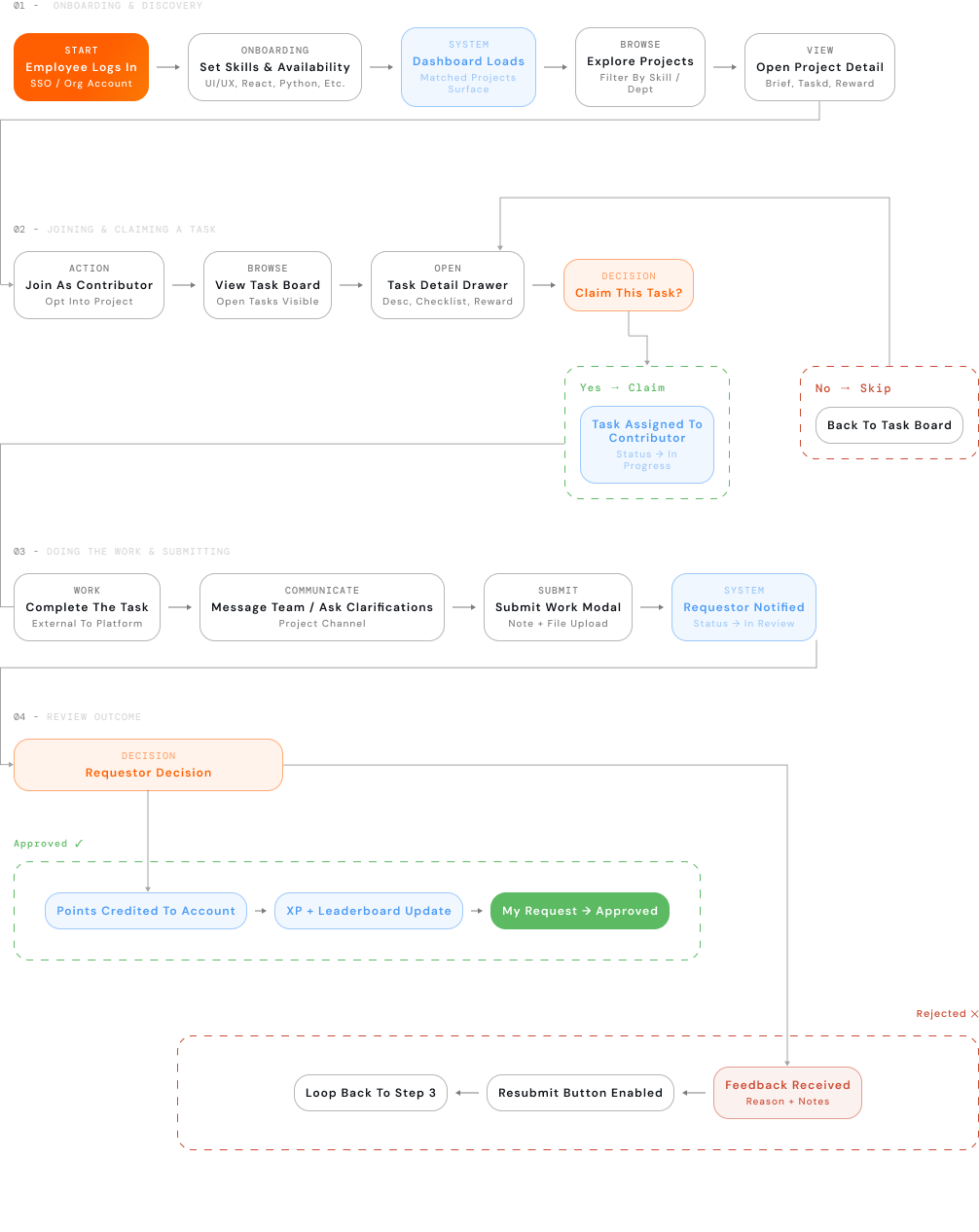
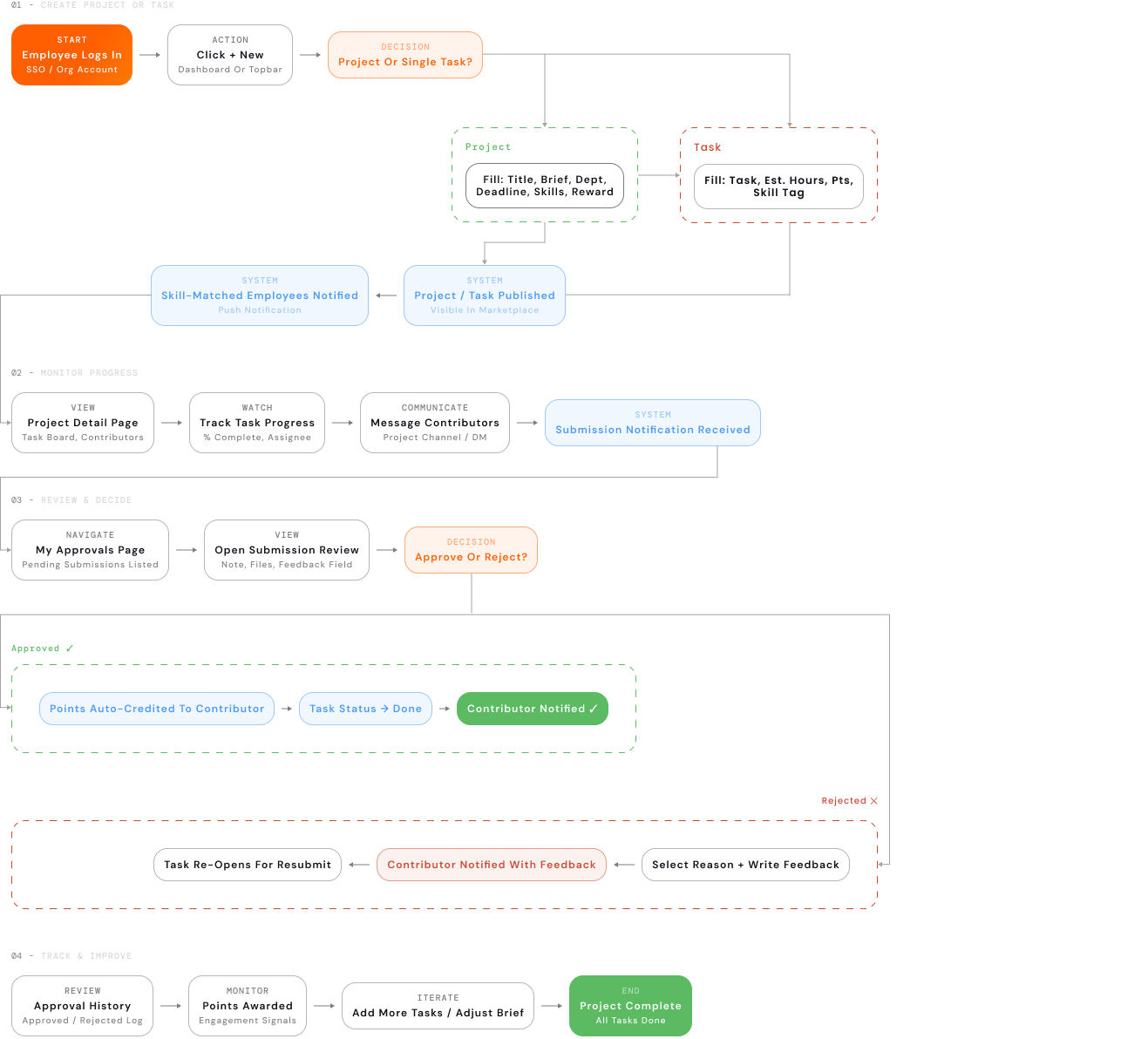
The platform operates as a closed loop between Requestors and Contributors. Every action on one side triggers a corresponding state on the other.

Contributor Flow

Contributor user flow diagram

Requestor Flow

Requestor user flow diagram
Start / End
User Action
Decision Point
System Action
Error Rejection

Contribution Loop

Login Set Skills Browse Join Project Claim Tasks Do Work Submit Wait for Review Get approved + Earn Points Repeat

Requestor Loop

Login Create project/task Get contributor applications monitor progress Review Submission Approve + award points
09 - Outcomes

Before engineering begins, sourceIN exists as a fully navigable, decision-ready Figma prototype. These are the tangible outputs of this design sprint.

8

Fully Wired Screens

Dashboard, Projects, Tasks, Leaderboard, Messages, Role Page, Project Detail, Profile all navigable and interactive.

Design Complete

2

Distinct Role Experiences

Requestor and Contributor see fundamentally different stats, CTAs, page content, and workflows even on the same screen.

Role-Aware UX

12+

Distinct Role Experiences

Submit work, approve/reject with feedback, create project with inline tasks, join, watch, message, search, file sharing all functional.

All Clickable

1

Figma File Delivered

A single, comprehensive Figma file components, flows, prototypes, design tokens, and developer handoff specs all in one place.

Design Handoff

Stakeholder Alignment

A tangible artefact to show decision-makers not a slide deck or a document

Hypothesis Testing

5 core assumptions can now be validated with real users using a walkable prototype

Engineering Spec

Every interaction, state, edge case, and role condition is documented in the prototype itself

Design Credibility

Demonstrates 0→1 product thinking, dual-role IA, gamification design, and end-to-end UX craft

Next Phase Gate

Prototype is the entry ticket for a formal usability study and engineering investment decision

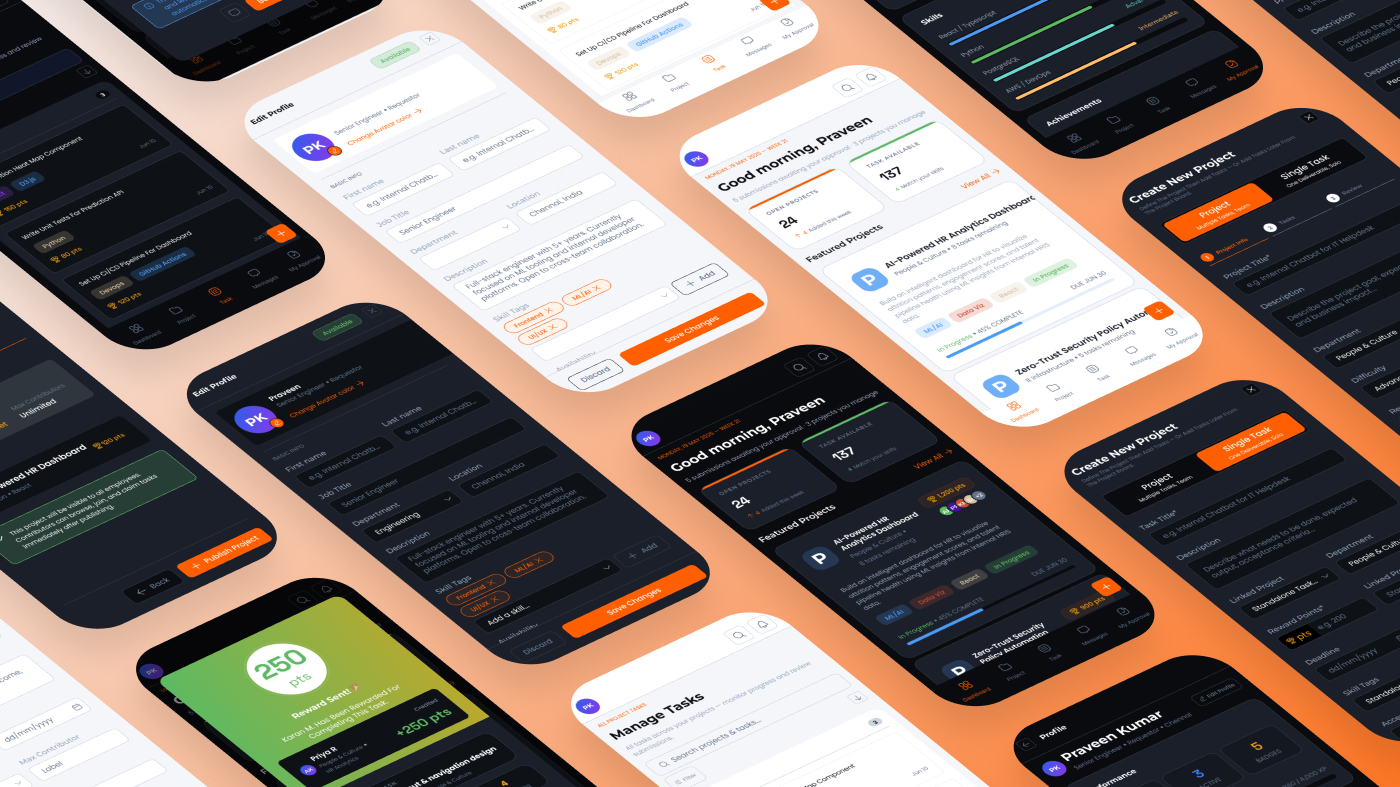
sourceIN app screens mockup
10 - Learnings

“Design taught me more than research would have.”

Reflection

Going from zero to a fully interactive dual-role platform without a single stakeholder interview forced me to make every assumption explicit, every design decision defensible, and every screen work hard enough to sell the idea on its own. That constraint turned out to be the most clarifying thing about this project.

01-06

Designing without users forces brutal prioritisation

Without real user data to anchor decisions, every feature has to justify itself from first principles. I couldn't hide behind "users said so." Every screen had to be explainable with a clear problem-to-solution rationale which actually made the design sharper, not vaguer. I cut 4 features mid-process because I couldn't answer why they existed.

02-06

Dual-role design is not twice the work — it's squared complexity

Every screen I designed had to make sense for two fundamentally different mental models. The same task card means "manage" to a Requestor and "opportunity" to a Contributor. I learned to think in role-pairs design one screen, then mentally switch seats and audit it again. This doubled my review time but caught dozens of UX inconsistencies before they were built.

04-06

Gamification needs a why, not just a what

Adding points and leader boards was easy. Justifying them was harder. I had to ask: what behaviour am I reinforcing, and is that the right one? I dropped a "streak" mechanic because it would reward frequency over quality exactly the wrong signal for a platform where work quality is the whole point. The incentive system went through three redesigns before it felt honest.

03-06

A PoC prototype is a research instrument, not a shortcut

I initially thought skipping research meant skipping rigour. I was wrong. The prototype became the research. Every interaction I built forced me to answer questions I'd have asked in an interview "What happens if the submission is rejected?", "What does the requestor see when no one claims their task?". Building the unhappy paths was as clarifying as any workshop.

05-06

Information architecture is the hardest design decision

Navigation felt settled until I realised the Leaderboard made no sense for a Requestor. That one observation rewrote the entire IA. Structure is not a starting-point decision it's a continuous audit. I restructured the nav three times over the project. The final version (8 screens, role-aware pages) only emerged because I kept asking "does this person actually need to come here?"

06-06

Communication is infrastructure, not a feature

I added messaging late, thinking it was a "nice to have." It turned out to be load-bearing. Without a project channel, the approval workflow becomes a black box contributors submit and have no idea what's happening. The moment I added the channel with the pinned task and the submission shortcut, the whole platform started to feel like a living system rather than a form factory.

✓ Would do again

Start with the approval flow first. It's the most critical interaction and the one where trust is built or lost. I built it last next time it's the anchor.

Design mobile-first from day one. Retrofitting responsive layout at the end cost twice as much effort as starting narrow would have.

Maintain a living assumption log. Tracking "what am I betting on here" per screen would have made the hypothesis slide write itself.

Prototype one happy path end-to-end before going wide. Full depth first, then breadth it surfaces structural problems before you have 8 screens to redo.

✕ Would do differently

Not introduce role-switching as a toggle. In a real product, roles should be set once and managed by admin the toggle was a prototype convenience that obscures a real product decision.

Run a quick guerrilla test before going high-fidelity. Moving to hi-fi Figma early felt productive but locked in decisions that a 30-minute low-fi test would have caught sooner.

Not build the Leader board before validating that points motivate participation. It's the most gamble-y assumption. Should have been last, not fourth.

Not skip a content audit. Labels, microcopy, empty states, and error messages were all afterthoughts they deserve their own design pass.

"The best thing this project taught me is that a prototype is not a deliverable it's a question with a user interface. The answer only comes when you put it in front of someone real."

Next Work
Charze
Charze
All Works(6)